
ACJ Electronics provides practical repair vs replace decision guidance in Poblacion, San Vicente, Ilocos Sur. Led by Angelo Carlo A. Jacinto (BS ECE, NC II), we apply a strict 50 percent economic rule comparing component-level repair costs against refurbished market value to prevent wasteful hardware spending.
When deciding whether to proceed with repair vs replace laptop, evaluating repair or replace phone dilemmas, determining is it worth repairing a laptop, or reviewing broader repair vs replace electronics economics, making an objective financial assessment protects your household or business budget. As the central decision-making pillar for ACJ Electronics, this hub assists clients throughout Poblacion, San Vicente, Vigan City, Bantay, Santa Catalina, Caoayan, and San Ildefonso who need honest advice on when to replace a broken phone or restore existing hardware. Consumer electronics represent significant capital investments. Knowing whether a device has suffered an isolated modular fault or a catastrophic system collapse gives you clarity on the most sensible financial path.
For detailed component-level rates across devices, consult our comprehensive Electronics Repair Pricing Hub. If you have already decided that your equipment warrants bench service, explore our dedicated commercial pages for affordable laptop services, computer repair services, mobile phone repair services, tablet repair services, speaker repair services, printer repair services, or music player repair services. For deeper hardware troubleshooting, review our specialized hubs: the Laptop Repair Hub, Phone Repair Hub, Printer Repair Hub, and Tools and Skills Hub, or browse our full directory on the services index.
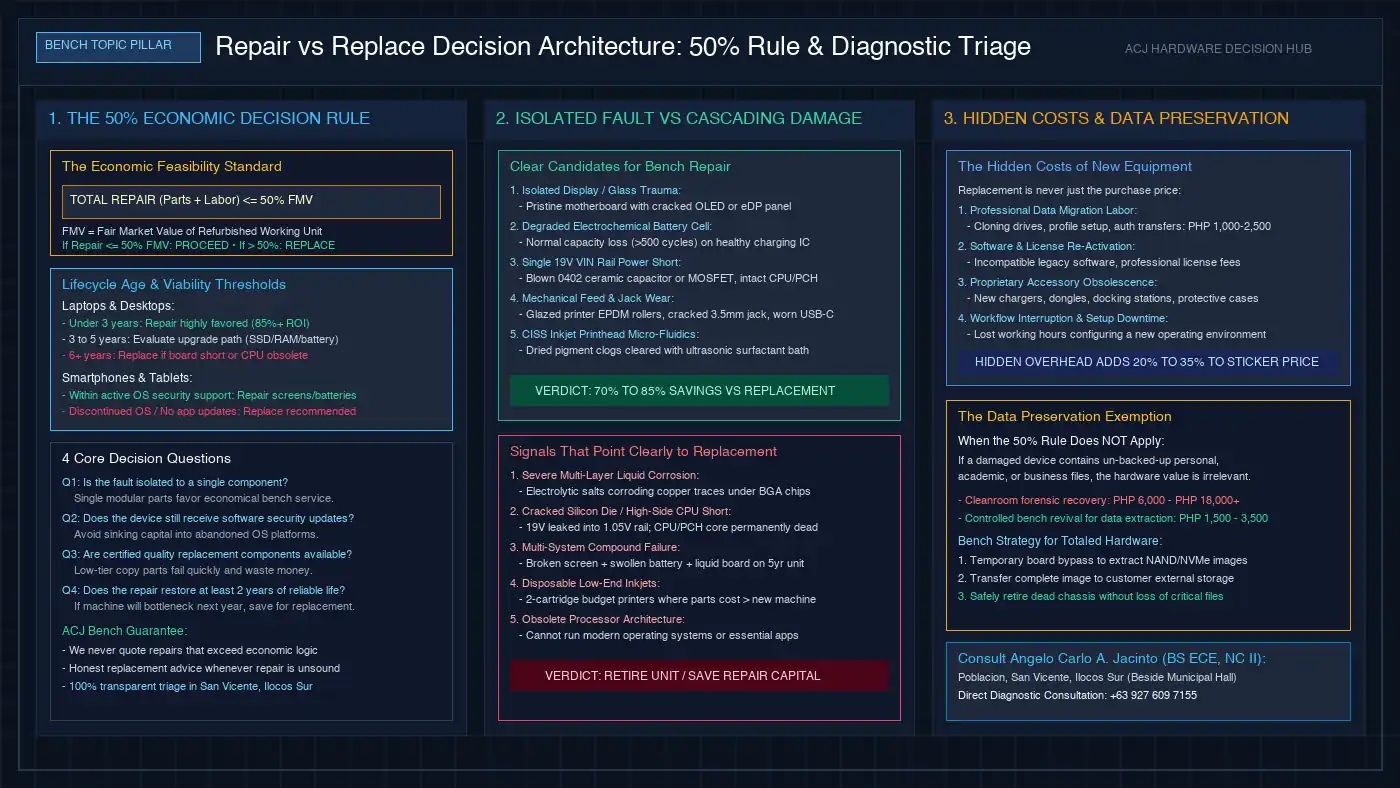
The 50 Percent Rule and Economic Feasibility Standard
Interactive Repair Feasibility & Cost Estimator
Select your device and fault to test benchmark pricing against the ACJ 50% economic repair feasibility rule.
This repair is well within our 50% economic feasibility standard. Component-level repair preserves your data, avoids e-waste, and saves significant money compared to purchasing a new device.
The core of our customer consultation rests on a straightforward, mathematically grounded principle: the 50 percent rule. We believe no customer should invest money into a gadget if doing so represents poor financial judgment.
The ACJ 50% Rule: If the total estimate for certified replacement parts and bench labor exceeds 50% of the fair market value (FMV) of an equivalent working secondhand or refurbished unit, we recommend replacing the machine rather than fixing it.
To apply this rule accurately on the bench, we evaluate three primary criteria:
- Refurbished Fair Market Value (FMV): We do not compare repair costs against the original purchase price from four years ago; electronics depreciate steadily. We compare repair quotes against what it currently costs to buy a fully tested, functional secondhand equivalent of that exact device generation.
- Component-Level SMT vs Module Swaps: Authorized depot service centers quote complete motherboard replacements (₱12,000 to ₱26,000), which routinely breaks the 50% threshold. At ACJ Electronics, component-level microsoldering (isolating a shorted ₱50 capacitor or ₱150 MOSFET for ₱1,800 to ₱3,500) brings the repair well below 20% of device value, making repair highly practical.
- Remaining Service Horizon: A repair must realistically buy at least 2 to 3 additional years of reliable service. If a laptop will lose software support or suffer processor bottlenecks within six months, spending 40% of its value on a screen repair is rarely justified.
Isolated Component Faults vs Cascading Multi-System Failures
Distinguishing between an isolated mechanical failure and a cascading electrical fault is the single most critical diagnostic step during bench triage. How a device failed determines whether repair is a permanent fix or a temporary bandage.
1. Isolated Modular Failures (High Repair Viability)
When a single physical component fails while the underlying logic board, power distribution network, and processor remain healthy, component-level repair is overwhelmingly the best choice. Examples of isolated faults include:
- A cracked OLED or LCD panel on a phone that still vibrates, chimes, and receives incoming calls.
- A swollen or degraded lithium battery that discharges quickly but has not leaked corrosive electrolyte onto the motherboard.
- A physically loosened or bent USB-C charging connector where internal PCB grounding and communication traces remain unburned.
- A shorted ceramic capacitor on a laptop 19V VIN power rail that tripped the bench power supply but left secondary 3.3V and 1.05V processor rails completely protected. Review our systematic diagnostic sequence in our laptop no-power troubleshooting guide.
2. Cascading Multi-System Failures (High Replacement Viability)
Cascading failures occur when an initial trauma propagates voltage surges or corrosive chemicals across multiple subsystems. Sinking money into fixing the first visible symptom often reveals a chain of secondary failures. Classic warning signs pointing to replacement include:
- Widespread Liquid Submersion: When mineral-heavy water or acidic liquids remain on an active motherboard, electrolytic dendrites grow beneath micro-BGA packages. Solder pads dissolve and multi-layer internal PCB traces delaminate. Learn about corrosion risks in our water damaged phone repair guide.
- High-Side Switching MOSFET Failure: If a 19V input MOSFET shorts drain-to-source on a CPU core buck converter, unattenuated 19V rushes directly into a delicate 1.05V silicon processor die, causing irreversible internal silicon destruction.
- Compounded Age-Related Failures: A 6-year-old laptop with a cracked display, failing battery, broken hinge mounts, and worn keyboard matrix. Sourcing four separate modules exceeds 70% of device value; replacement is the only logical path.
The Hidden Costs of Device Replacement
When weighing a high repair quote, consumers often assume that buying a replacement machine is the cheaper option. However, purchasing new hardware involves significant hidden secondary expenses that are frequently overlooked:
- Data Migration and Profile Configuration: Transferring hundreds of gigabytes of files, browser profiles, email archives, and software databases requires hours of technician labor, typically costing ₱1,000 to ₱2,500 if handled by a computer service center.
- Software Licensing and Operating Incompatibilities: Upgrading to a new operating system platform often forces the repurchase of software licenses or renders essential legacy specialized tools incompatible.
- Proprietary Accessory Obsolescence: Changing device hardware frequently obsoletes proprietary charging docks, external battery packs, protective carrying cases, and monitor connection adapters, requiring additional peripheral purchases.
- Productivity Downtime: The non-monetary cost of learning a new operating layout, setting up credentials, and configuring working environments interrupts business and academic output.
Cross-Device Repair vs Replace Decision Breakdown
Hardware economics vary dramatically across electronic categories due to manufacturing techniques, component modularity, and consumable supplies:
1. Laptops and Desktop Computers
Personal computers offer outstanding repairability due to modular sockets and standardized bus protocols. Upgrading an aging mechanical drive to an NVMe SSD and refreshing thermal paste revitalizes machines for years. Screens, keyboards, and DC jacks are readily available. Sourcing replacement panels is explored in our laptop screen replacement cost guide, while keyboard mechanics are detailed in our laptop keyboard repair guide. Replacement is only advised when dual-core processors cannot handle modern web standards, or when multi-layer motherboard burns make trace repair unsafe.
2. Smartphones and Tablets
Mobile devices feature tightly packed, adhesive-bonded glass assemblies. Replacing a cracked display or degraded battery on a device under 4 years old is highly economical. Review specific price points in our iPhone screen replacement cost guide and Android battery replacement cost guide. However, when an older phone stops receiving operating system security updates, mobile banking applications cease functioning. Investing heavily in hardware that is software-obsolete is financially imprudent.
3. Printers and Office Imaging
Printers present the widest economic contrast. Budget cartridge inkjets sold under ₱4,000 are disposable loss-leaders; replacing printheads or fusers costs more than a new box. Conversely, Continuous Ink Supply System (CISS) tank printers (₱8,000 to ₱16,000) are prime candidates for ultrasonic printhead cleaning, roller de-glazing, and waste pad counter resets. Examine market repair rates in our printer repair cost guide.
4. Audio Systems and Speakers
Quality acoustic cabinets and drivers do not become obsolete. A high-end speaker cabinet with dried, rotting foam surrounds or a shorted Class-D amplifier board can be restored to factory acoustic performance for a fraction of new speaker prices. Only low-cost, sealed plastic Bluetooth speakers assembled with structural epoxy shift marginal decisions toward replacement.
Comprehensive Cross-Device Repair vs Replace Decision Matrix
The table below summarizes common hardware failure scenarios, diagnostic conditions, bench feasibility, and the definitive economic verdict under ACJ Electronics standards:
| Device Category & Scenario | Diagnostic Condition & Age | Bench Repair Feasibility | Economic Verdict | Engineering & Financial Rationale |
|---|---|---|---|---|
| Laptop: 19V VIN Short Unit dead, zero power response |
Laptop 1 to 4 years old; shorted capacitor or MOSFET, intact CPU | High (Component SMT micro-soldering) | REPAIR | Repair costs ₱1,800–₱3,800 vs ₱30,000+ new laptop. Massive 85%+ capital savings with zero data loss. |
| Laptop: Sluggish Boot & Apps Takes 5 minutes to boot Windows |
Laptop 3 to 6 years old; mechanical HDD 100% disk usage, good CPU | Very High (M.2 NVMe SSD + thermal paste) | REPAIR / UPGRADE | Upgrading to NVMe SSD (₱2,000–₱4,600 installed) multiplies system speed 5x, postponing replacement for 3+ years. |
| Laptop: Severe Liquid Board Submerged, extensive corrosion |
Laptop 5+ years old; corroded traces under BGA chips, 3 failed rails | Low (Unstable multi-rail shorting) | REPLACE (Extract Data) | Corrosion under BGA silicon causes recurring faults. Stabilize board temporarily to extract files, then replace chassis. |
| Smartphone: Cracked Display Touch digitizer or glass shattered |
Phone 1 to 3 years old; healthy logic board, active OS updates | High (OEM-grade screen assembly) | REPAIR | New display (₱1,800–₱6,500 installed) costs well under 50% FMV, extending phone utility through update window. |
| Smartphone: EOL Software & Port Loose port, broken back glass |
Phone 5+ years old; discontinued Android OS, banking apps blocked | Moderate (Port microsoldering) | REPLACE | Hardware repair is physically possible, but operating system obsolescence blocks critical apps within months. |
| Tablet: Swollen Battery Display lifting, quick battery drain |
Tablet 2 to 4 years old; clean logic board, no frame bend | High (High-capacity lithium pouch swap) | REPAIR | Battery renewal (₱1,200–₱2,800 installed) eliminates hazardous chemical swelling and restores all-day tablet runtimes. |
| Printer: CISS Printhead Clog Missing nozzle lines, blank sheets |
Tank printer (EcoTank/MegaTank); valued at ₱9,000–₱15,000 | Very High (Ultrasonic surfactant flush) | REPAIR | Fluidic recovery costs ₱800–₱1,800. Buying a new tank printer costs ₱10,000+. Exceptional return on repair capital. |
| Printer: Budget 2-Cartridge Jam Striped gear train, head fault |
Entry-level inkjet originally bought for ₱3,200 | Low (Parts unavailable or costly) | REPLACE | Replacement parts and labor reach ₱2,500+ (78% of new printer). Replacing with a CISS tank model is smarter. |
| Audio: Speaker Foam Dry-Rot Cracked acoustic surround, rub |
Hi-Fi or studio speaker; heavy acoustic cabinet | High (Cone surround re-foaming) | REPAIR | Re-foaming (₱800–₱1,800) restores deep acoustic bass response. Replacing quality speaker drivers costs ₱6,000+. |
The Data Preservation Exemption
There is one crucial scenario where the 50 percent rule does not apply: when irreplaceable data is trapped inside a non-functioning device. Personal photographs, academic dissertations, and commercial accounting databases carry value far beyond the physical market value of the hardware housing them.
When a customer brings in a water-logged laptop or severely crushed phone that is economically totaled as a daily machine, our bench strategy shifts from full restoration to controlled data preservation. We perform localized power rail stabilization, bypass damaged charging circuits using a regulated DC power supply, clean corroded bus lines, and image the internal NAND flash or NVMe drive directly to customer backup media. Learn about data risks in our data recovery cost vs risk analysis. Once your data is safely in your hands, the totaled chassis can be retired without regret.
Frequently Asked Questions
Key repair versus replace decision questions answered directly by Senior Hardware Diagnostic Engineer Angelo Carlo A. Jacinto:
What is the 50 percent rule for repairing or replacing electronics?
The 50 percent rule is our core economic standard: if the total cost of certified replacement components and bench labor exceeds half the fair market value of an equivalent working secondhand or refurbished device, we recommend replacement. If repair expenses remain under 50% and the device still has years of reliable service life, proceeding with component-level repair delivers superior financial return.
Is it worth repairing an older laptop that runs sluggishly?
Yes, if the motherboard and display panel are intact. Sluggish performance on laptops between 3 and 6 years old almost always stems from mechanical hard drive bottlenecking, thermal throttling from crusty thermal compound, or clogged heatsink fins. Installing an M.2 NVMe solid-state drive (₱1,500 to ₱3,500) and performing a thermal overhaul (₱700 to ₱1,300) revitalizes the machine to modern operating speeds for a fraction of the cost of a new laptop.
When does phone water damage make replacement a better choice than repair?
Water damage favors replacement when liquid exposure occurred under battery power days earlier and electrolytic corrosion has spread across multi-layer logic board planes, dissolving solder pads under major ball-grid-array (BGA) silicon chips. If corrosion is isolated to charging ports, display connectors, or battery terminals, ultrasonic cleaning and microsoldering remain highly viable. However, if multiple power rails have collapsed, we advise retrieving critical data and replacing the handset.
Why should I consider the hidden costs of buying a replacement device?
Purchasing a new device involves substantial hidden costs beyond retail sticker price. These include professional data migration labor (₱1,000 to ₱2,500), software license transfers, proprietary accessory obsolescence (such as incompatible chargers, docking stations, and protective cases), and productive work downtime spent setting up a new operating environment. Factoring in these secondary expenses often makes component-level repair the far more economical choice.
Does having un-backed-up data override the 50 percent rule?
Yes, absolutely. The 50 percent rule applies strictly to hardware value. If a damaged laptop, phone, or external drive contains irreplaceable personal memories, academic research, or commercial accounting records, recovering those files takes precedence. In such cases, we perform temporary board-level triage to stabilize power rails for forensic data imaging, allowing you to secure your data before retiring the physical chassis.
How do I know if an inkjet printer is worth fixing or should be discarded?
Printers divide sharply by ink delivery technology. Continuous Ink Supply System (CISS) tank printers costing ₱8,000 to ₱16,000 (such as Epson EcoTank or Canon MegaTank) are outstanding candidates for printhead flushing, roller de-glazing, or waste pad counter resets. Conversely, entry-level budget printers that use disposable two-cartridge systems should almost always be replaced, as replacement printhead parts frequently cost more than a brand-new printer.
Schedule an Honest Diagnostic Consultation
Stuck on whether to fix your broken laptop, phone, printer, or electronics? Visit our workshop in Poblacion, San Vicente, Ilocos Sur or contact our engineering team. We will inspect your hardware, run unpowered diagnostics, and tell you plainly whether repair or replacement is your most cost-effective move.