
ACJ Electronics provides component-level smartphone diagnostics in Poblacion, San Vicente, Ilocos Sur. Led by Angelo Carlo A. Jacinto (BS ECE, NC II), this phone repair hub guides you through display failures, battery swelling safety, USB-C micro-soldering, and board short circuits before deciding between repair or replacement.
When searching for reliable phone repair, an authoritative smartphone repair guide, or practical cellphone repair troubleshooting, understanding your hardware failure is the key to making an informed financial decision. As the central mobile phone repair hub for ACJ Electronics, this resource serves clients across San Vicente, Vigan City, Bantay, Santa Catalina, and Caoayan who need dependable phone repair San Vicente. Smartphone hardware packs microscopic circuit traces, fragile glass substrates, and high-energy lithium batteries into ultra-thin enclosures. Distinguishing a quick modular fix from a complex logic board fault saves you from paying for parts you never needed.
If you are ready for professional workshop intake rather than troubleshooting, jump directly to our commercial mobile phone repair services or our dedicated tablet repair services. For broader pricing comparisons, consult our cross-device Electronics Repair Pricing Hub, assess financial feasibility in the Repair vs Replace Hub, review our bench instrumentation in the Tools and Skills Hub, or explore our complete repair catalog on the services index.
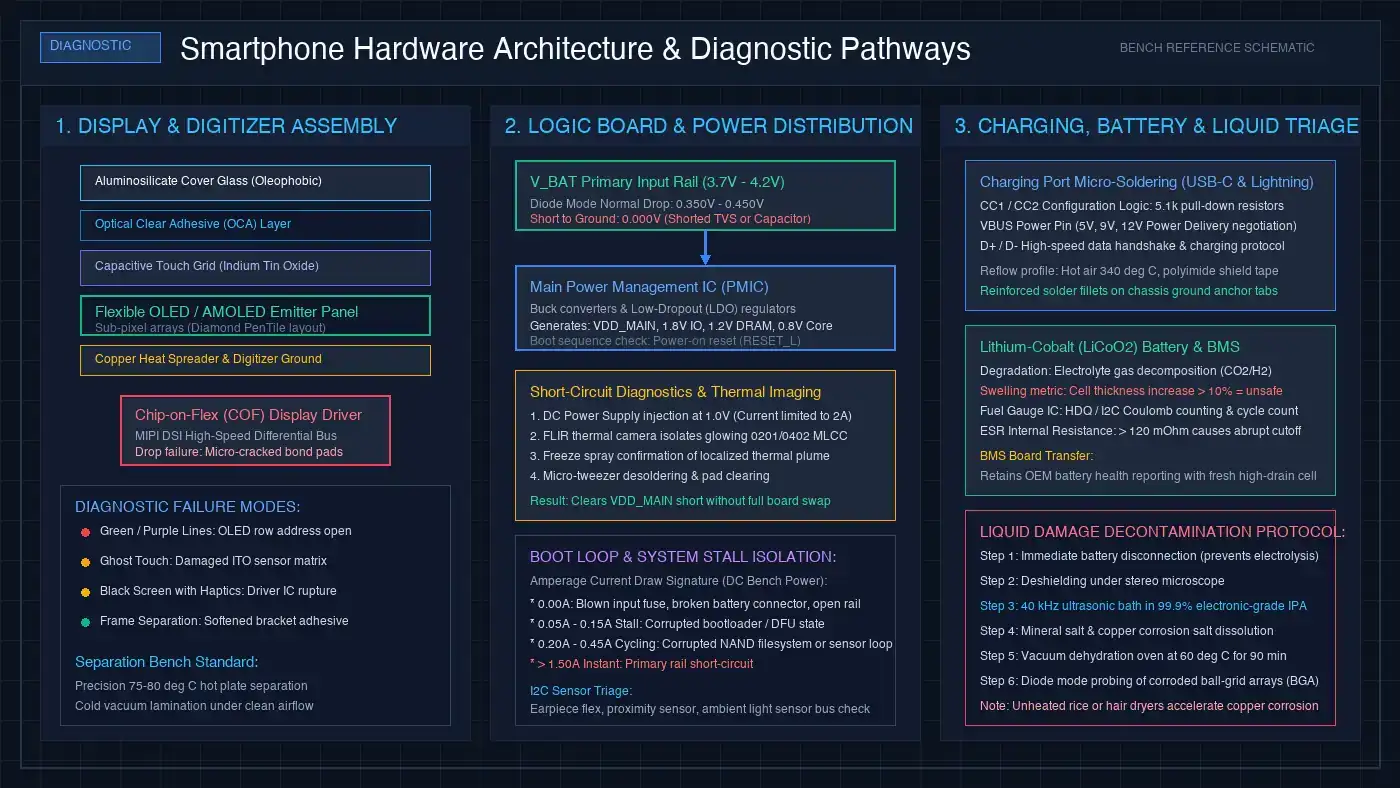
Start With Symptoms: Triage and Common Failure Modes
On our engineering bench, smartphone failures divide cleanly into two categories: external modular faults and internal logic board faults. Modular components (screens, batteries, charging ports, cameras, and speaker modules) connect to the mainboard via flat printed circuit (FPC) press-fit connectors. Board-level failures involve micro-soldered components, power management integrated circuits (PMICs), and microscopic surface-mount capacitors measuring 0.5 mm by 0.25 mm (0201 packages).
Before committing to any repair, match your device behavior against these diagnostic baselines:
1. Display Assembly Damage, AMOLED Micro-Fractures, and Digitizer Separation
Modern smartphones utilize either In-Plane Switching (IPS) LCD or Active-Matrix Organic Light-Emitting Diode (AMOLED) displays. While an exterior glass fracture is immediately visible, internal display panel failure often presents without broken surface glass. A sharp impact can fracture the brittle 0.2 mm silicon substrate beneath the glass, causing vertical green or purple lines, localized black ink blotches that spread across pixels, or total screen blackouts while the phone vibrates and rings.
Touch responsiveness issues also point to distinct sub-layers. If the screen registers phantom taps without your finger touching it (ghost touch) or ignores touches in specific horizontal bands, the Indium Tin Oxide (ITO) sensor matrix has fractured. On modern laminated displays, the cover glass, digitizer grid, and OLED panel are fused with optically clear resin. Restoring touch functionality requires a complete calibrated screen assembly replacement. For brand-specific cost analysis, read our breakdown on iPhone screen replacement cost.
2. Battery Chemical Degradation, Fuel Gauge Calibration, and Swelling Hazards
Smartphones run on lithium-cobalt oxide (LiCoO2) pouch cells. Every full charge cycle causes microscopic physical expansion and contraction in the cathode and anode layers. After 400 to 500 charge cycles, elevated internal equivalent series resistance (ESR) impairs the battery ability to supply peak current spikes. This causes the terminal voltage to collapse under heavy processor load, triggering sudden shutdowns at 20% or 30% battery capacity.
When lithium cells degrade severely or suffer over-charging from uncertified chargers, electrolyte breakdown generates volatile hydrocarbon gases, causing the pouch to swell. Swelling exerts intense outward mechanical pressure, lifting the display assembly away from the midframe or popping the rear glass cover. Never clamp, puncture, or press down on a swollen battery. Review our critical safety instructions in our battery swelling warning signs guide, assess budget guidelines in our Android battery replacement cost guide, and explore DIY precautions in our Android phone battery repair guide.
3. USB-C and Lightning Charging Port Micro-Soldering and VBUS Tracing
Charging ports experience extreme physical wear and environmental exposure. Pocket lint, dust, and conductive moisture pack into the bottom of the connector cavity, preventing charging cables from seating flush against the housing. Cleaning out compacted lint under a stereo microscope with non-conductive fine-point tweezers often resolves intermittent charging immediately.
If cleaning does not help and the cable must be held at an angle to initiate charge, the internal connector tongue has cracked or the surface-mount solder joints have sheared from the circuit board ground pads. Furthermore, modern USB-C ports utilize Configuration Channel (CC1 and CC2) lines to negotiate 5V, 9V, or 12V Power Delivery voltages. If the CC pins short or an unshielded car charger delivers a high-voltage surge, the transient voltage suppressor (TVS) diodes short to ground to protect the PMIC. We inspect and replace damaged receptacles using hot air at 340°C and SAC305 lead-free solder. Learn more in our dedicated charging port repair guide.
4. Liquid Damage Corrosion Mitigation and Ultrasonic Decontamination
Dropping a smartphone in water, soda, or seawater initiates instant electrochemical corrosion. When electrical current flows through mineral-rich moisture, copper traces dissolve, electrolytic solder bridges grow between power rails, and protective tin plating oxidizes into conductive salts. The first ten minutes following a spill determine whether the motherboard survives.
Burying a phone in uncooked rice is a dangerous myth: dry rice cannot extract moisture trapped beneath soldered metal radio-frequency (RF) shields, and rice starch dust clogs microphone mesh and charging ports. Hair dryers and ovens are equally harmful, as heat accelerates galvanic corrosion and softens display adhesives. The only effective procedure is immediate battery disconnection, shield removal, ultrasonic cleaning in 99.9% electronic-grade isopropyl alcohol (IPA) at 40 kHz, and microscopic solder reconditioning. Read our full protocol in our water damaged phone repair guide.
5. Boot Loops, Firmware Crashes, and Primary Logic Board Shorts
When a smartphone restarts endlessly on the manufacturer boot logo, the cause can be software or hardware. Interrupted operating system updates, corrupted system partition tables, or full storage caches corrupt the bootloader sequence, requiring low-level flashing via Android Fastboot or iPhone DFU recovery mode.
However, boot loops frequently stem from hardware failures. A fractured solder joint on an ambient light sensor, a corroded earpiece speaker flex cable shorting the I2C communication bus, or an aged battery that drops below 3.4V during boot will trap the CPU in a continuous restart loop. On our bench, we connect the logic board to an adjustable DC bench power supply and analyze the boot current signature. A current stall at 0.15A indicates a firmware failure, while an instant surge beyond 1.5A confirms a short-circuited capacitor on the primary VDD_MAIN or V_BAT power rail. Learn to identify these patterns in our boot loop diagnostics guide.
Cluster Guides and Deep-Dive Diagnostic Resources
Explore our targeted troubleshooting and pricing guides for step-by-step diagnostic workflows across specific mobile components:
- Charging Hardware: Charging Port Repair: Causes, Diagnostics, and Micro-Soldering Steps
- Liquid Exposure: Water Damaged Phone Repair: Emergency Triage and Corrosion Control
- Battery Safety: How to Identify Battery Swelling and What to Do Immediately
- System Software & Boot: What Boot Loop Means on Android and iPhone: Diagnostic Tracing
- Display Costs: iPhone Screen Replacement Cost: Genuine vs Aftermarket Panels
- Battery Pricing: Android Battery Replacement Cost in the Philippines: Fair Rates
- Battery DIY Safety: Android Phone Battery Repair: Practical Inspection and Safe Replacement
Smartphone Hardware Diagnostic and Triage Comparison Matrix
The table below summarizes common smartphone symptoms, their probable component causes, bench diagnostic procedures, and practical repair feasibility at ACJ Electronics in San Vicente:
| Reported Symptom | Probable Root Cause | Bench Diagnostic Method | Repair Feasibility |
|---|---|---|---|
| Screen is completely black, but phone vibrates, rings, and receives calls | Fractured OLED substrate or disconnected display FPC connector | Microscope inspection of display flex, test with calibrated reference screen assembly | High (Screen assembly replacement) |
| Charging cable must be held at an angle to charge or connects intermittently | Compacted pocket lint, fractured port pins, or sheared ground anchor pads | Stereo microscope cavity check, inline USB power meter draw test, continuity probing | High (Port cleaning or USB-C micro-soldering) |
| Phone shuts down abruptly when opening the camera or loading heavy apps | Exhausted battery with high internal resistance (ESR) unable to deliver surge power | Electronic DC load discharge profiling, real-time voltage sag monitoring | High (Li-ion battery renewal) |
| Display lifts outward from frame, creating a visible seam gap along the side | Degraded lithium pouch battery generating internal hydrocarbon gas pressure | Physical thickness measurement, immediate battery isolation and safe removal | High (Immediate battery replacement) |
| Phone dropped in water, powers on briefly, then shuts off completely | Galvanic corrosion shorting VDD_MAIN decoupling capacitors under RF shields | Deshielding, 40 kHz ultrasonic IPA bath, thermal camera short isolation | Moderate to High (Depends on exposure duration) |
| Device restarts endlessly on boot logo without reaching the home screen | Corrupted bootloader, collapsed battery cell, or shorted I2C sensor bus | DC bench power supply current profiling, DFU flashing, earpiece flex isolation | High (Firmware refresh or flex replacement) |
Pricing, Planning, and the 50 Percent Decision Standard
Before proceeding with any smartphone service, we evaluate your device against our practical 50 percent decision standard: if the combined cost of reliable replacement parts and skilled bench labor exceeds half the market value of an equivalent working phone, we advise replacement rather than repair.
Modular repairs on mid-range and premium smartphones offer outstanding financial value. Installing a fresh OEM-grade battery, micro-soldering a loose USB-C port, or replacing a cracked display on a device that costs ₱15,000 to ₱50,000 typically represents 15% to 30% of its replacement cost, extending its working lifespan by several years. Conversely, if an entry-level smartphone retailing under ₱4,000 suffers water damage requiring a new screen, battery, and board repair, replacement is the more sensible financial decision.
To evaluate fair labor and parts rates across all categories, review our detailed guide in the Electronics Repair Pricing Hub and weigh your options in the Repair vs Replace Hub.
Before You Hand Your Smartphone In: Workshop Preparation
To ensure a smooth diagnostic and protect your personal files, follow these bench intake steps before dropping your device off at our workshop in Poblacion, San Vicente, Ilocos Sur:
- Back Up Personal Data: If the screen still functions and touch responds, back up your photos, contacts, and WhatsApp or Viber chats to cloud storage or a computer. While standard hardware repairs do not alter internal flash memory, having a backup eliminates data loss risk.
- Record Your Passcode: Full post-repair hardware verification (testing proximity sensors, ambient light sensors, cameras, microphones, speakers, and cellular reception) requires access to the operating system.
- Remove SIM and Micro-SD Cards: Keep your physical SIM card with you so you can transfer your cellular number to a backup phone while your device is serviced.
- Mention Prior Repairs or Liquid Exposure: Inform our technicians if the device was previously opened by another shop or exposed to water. Prior repairs often involve missing screws, damaged heat shields, or brittle aftermarket adhesives that require careful handling.
Frequently Asked Questions
Key smartphone repair questions answered directly by Senior Hardware Diagnostic Engineer Angelo Carlo A. Jacinto:
Will replacing my cracked phone screen erase my photos or personal data?
No. Replacing a broken screen assembly is a modular hardware repair that does not alter or erase your internal NAND flash storage. Your photos, messages, and downloaded applications remain completely intact. However, we always recommend creating a backup before bringing any damaged electronic device in for repair whenever the screen still allows touch input.
Should I keep charging my phone if the charging cable only works at a specific angle?
No. Wiggling or bending a charging cable to force electrical contact exerts extreme mechanical leverage on the delicate internal receptacle pins and circuit board mounting pads. This can short the 5V or 9V VBUS line directly to ground or data lines, potentially destroying the charging management IC or processor. We clean packed lint or micro-solder a new reinforced connector to resolve the issue safely.
Is placing a water-damaged phone in uncooked rice effective?
No. Placing a wet phone in dry rice is an ineffective internet myth. Rice cannot extract liquid trapped beneath soldered metal radio-frequency shields or inside display layers. Worse, rice introduces fine starch dust into ports and speaker grilles while allowing galvanic corrosion to dissolve copper board traces. The correct procedure is immediate power-off, battery disconnection, and professional ultrasonic cleaning in 99.9% isopropyl alcohol.
How do I know if my phone battery is swelling, and is it dangerous?
A swelling battery typically pushes the display assembly outward, creates a visible gap between the frame and back glass, causes localized discoloration pressure spots on the screen, or prevents the phone from resting flat on a table. Swollen lithium-ion pouch cells are hazardous fire risks because accumulated hydrocarbon gases can puncture and combust. Stop charging the device immediately and bring it in for safe isolation.
Why does my phone get stuck in a boot loop restarting on the manufacturer logo?
A boot loop can result from corrupted operating system firmware or hardware component failures. Hardware causes include a degraded battery unable to sustain voltage during boot, a shorted capacitor on the main power rail, a damaged earpiece flex cable shorting the sensor bus, or cracked solder joints beneath the CPU. We connect the phone to an adjustable DC bench supply to analyze the current draw signature and isolate the fault.
How does the 50 percent rule apply to smartphone repairs?
We advise repair whenever the combined cost of certified replacement parts and bench labor remains under 50 percent of the market price of an equivalent working phone. High-end and mid-range phones are prime candidates for screen replacements, fresh batteries, and charging port micro-soldering. Inexpensive budget phones with multiple compound failures are usually better replaced.
Book a Diagnostic at ACJ Electronics
Need expert phone repair in Poblacion, San Vicente, or nearby towns in Ilocos Sur? Visit our main workshop or contact our engineering counter for an honest diagnostic assessment before any paid work begins.